
主题
🗂️ 表与数据结构
掌握 Lua 表(Table):Lua 中唯一的数据结构,通用容器
📖 表的基础
在 Lua 中,表(table)是唯一的数据结构,既是数组、又是字典、还可以模拟对象。
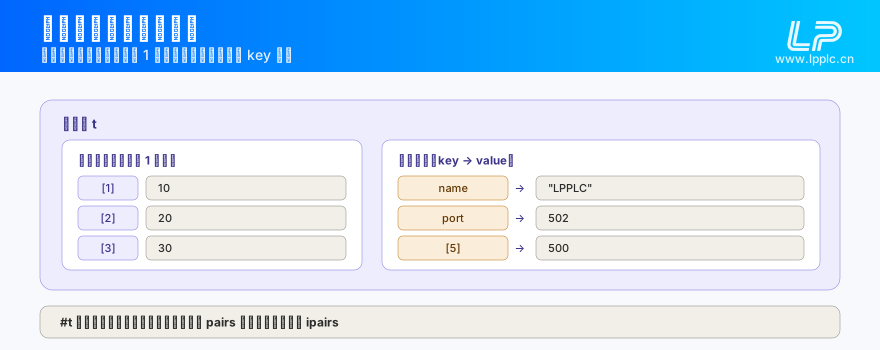
lua
-- 创建空表
local t = {}

-- 创建数组式表
local arr = {10, 20, 30}

-- 创建字典式表
local dict = {name = "LPPLC", port = 502}

-- 混合表
local mixed = {100, 200, name = "test", [5] = 500}
📚 数组
Lua 数组索引从 1 开始:
lua
local arr = {10, 20, 30, 40, 50}

-- 访问元素
print(arr[1])     -- 10
print(arr[5])     -- 50
print(#arr)       -- 5(长度)

-- 修改和添加
arr[3] = 99       -- 修改:{10, 20, 99, 40, 50}
arr[6] = 60       -- 添加:{10, 20, 99, 40, 50, 60}
数组操作
lua
-- 插入(末尾)
local arr = {1, 2, 3}
table.insert(arr, 4)          -- {1, 2, 3, 4}

-- 插入(指定位置)
table.insert(arr, 2, 99)     -- {1, 99, 2, 3, 4}

-- 删除(末尾)
local val = table.remove(arr) -- 返回 4,arr={1, 99, 2, 3}

-- 删除(指定位置)
local val = table.remove(arr, 2) -- 返回 99,arr={1, 2, 3}

-- 排序
local data = {30, 10, 20}
table.sort(data)              -- {10, 20, 30}

-- 连接
local parts = {"A", "B", "C"}
print(table.concat(parts, ","))  -- "A,B,C"
📖 字典
lua
local device = {
    name = "LPPLC-3202",
    ip = "192.168.1.100",
    port = 502,
    online = true
}

-- 访问
print(device.name)        -- "LPPLC-3202"
print(device["ip"])       -- "192.168.1.100"

-- 修改
device.port = 503

-- 添加新字段
device.firmware = "v2.0"

-- 删除字段
device.online = nil
遍历字典
lua
local config = {ip = "192.168.1.1", port = 502, timeout = 3000}

-- pairs 遍历(顺序不确定)
for key, value in pairs(config) do
    print(key .. " = " .. tostring(value))
end

-- ipairs 遍历数组部分(按索引顺序)
local arr = {10, 20, 30}
for i, v in ipairs(arr) do
    print(i, v)
end
🔧 嵌套表
lua
-- 多层嵌套
local system_config = {
    network = {
        wifi = {
            ssid = "MyNetwork",
            password = "12345678"
        },
        eth = {
            ip = "192.168.1.100",
            mask = "255.255.255.0",
            gateway = "192.168.1.1"
        }
    },
    cloud = {
        enabled = true,
        server = "cloud.linpan.com"
    }
}

-- 访问嵌套字段
print(system_config.network.wifi.ssid)        -- "MyNetwork"
print(system_config.cloud.server)              -- "cloud.linpan.com"
🏗️ 用表模拟对象
lua
-- 定义一个设备对象
local Device = {}
Device.__index = Device

function Device.new(ip, port)
    local self = setmetatable({}, Device)
    self.ip = ip
    self.port = port
    self.connected = false
    return self
end

function Device:connect()
    print("连接 " .. self.ip .. ":" .. self.port)
    self.connected = true
end

function Device:send(data)
    if not self.connected then
        print("未连接!")
        return
    end
    print("发送到 " .. self.ip .. ": " .. data)
end

-- 使用
local dev = Device.new("192.168.1.10", 502)
dev:connect()
dev:send("Hello")
现场常用脚本 面向对象.LPLUA(原文)
依赖模块:无(纯 Lua 基础库)| 难度:★★☆
上面那个 Device 是规范写法。现场用得最多的其实是下面这份(文件 面向对象.LPLUA): 它从网上那篇经典“Lua 元类”教程改来,只建一个实例时结果完全正确,建第二个实例就会把第一个覆盖掉。 另:文件 派生类.LPLUA 与 面向对象.LPLUA 内容字节完全相同,所以只收录一份,真正的派生写法见本节末尾。
完整代码(面向对象.LPLUA 原文):
lua
-- 元类
Rectangle = {area = 0, length = 0, breadth = 0}

-- 派生类的方法 new
function Rectangle:new (o,length,breadth)
  o = o or {}
  setmetatable(o, self)
  self.__index = self
  self.length = length or 0
  self.breadth = breadth or 0
  self.area = length*breadth;
  return o
end

-- 派生类的方法 printArea
function Rectangle:printArea ()
  print("矩形面积为 ",self.area)
end
r = Rectangle:new(nil,10,20)
print(r.length)
r:printArea()要点:
setmetatable(o, self)+self.__index = self这两行是“类”的全部机制:实例o自己是空的,访问o.xxx时先在o里找,找不到就顺着__index到类表里找。- ⚠ 陷阱在
new里:self.length = …写的是self(就是Rectangle这张类表本身),不是新实例o。因为上面那条__index规则,r.length照样能读到 10、r:printArea()照样能打 200 —— 一个实例时看不出任何异常。 - 一旦
new第二个实例,类表上的length/breadth/area被直接覆写,所有旧实例跟着变(它们自己本来就没存字段)。这是“看着能跑、多台设备就串数据”的典型写法。 Rectangle没加local,是全局类表 —— 在 LPPLC 里多个脚本文件共用一套 Lua 状态时,全局类名很容易互相覆盖,自己写时建议local Rectangle = …。
只改三行的修正版(字段存进实例,不存进类表):
lua
function Rectangle:new(o, length, breadth)
    o = o or {}
    setmetatable(o, self)
    self.__index = self
    o.length = length or 0      -- 原来是 self.length
    o.breadth = breadth or 0    -- 原来是 self.breadth
    o.area = o.length * o.breadth  -- 原来是 self.area
    return o
end真正的派生类(原文件名叫“派生类”,但内容里没有派生;补一段):
lua
Square = setmetatable({}, Rectangle)   -- Square 这张类表的元表是父类
Square.__index = Square

function Square:new(o, side)
    o = o or {}
    setmetatable(o, self)              -- 实例沿 Square → Rectangle 往上找
    self.__index = self
    o.length, o.breadth = side, side
    o.area = side * side
    return o
end

s = Square:new(nil, 5)
print(s.area)      -- 25(自己有的字段)
s:printArea() -- 用的是父类的 Rectangle:printArea → 打印“矩形面积为 25”查找会沿元表链一路往上:s → Square → Rectangle,这就是“子类没定义的方法自动用父类的”。
验证方法:
- 原脚本直接跑:打印
10与矩形面积为 200—— 这一步看不出问题。 - 再加一行
r2 = Rectangle:new(nil,3,4),然后print(r.length)与r:printArea():它们变成了 3 和 12 —— 这就是实例互相覆盖的直接证据。 - 换上修正版重跑第 2 步:
r应该仍是 10 / 200,r2是 3 / 12,两者互不影响。 - 派生那段:
s:printArea()能打通,就证明printArea是从Rectangle沿元表链找到的(Square自己没定义它)。
注意事项:
r:printArea()用冒号;写成r.printArea()会把self传成nil,报“attempt to index a nil value”。- 把这份脚本里的
self.xxx当“成员变量”写习惯,是 LPPLC 脚本里最多见的一个坑:同一块板上控多台设备时全部读回同一个值。 - 不要试图给
mqtt.creat/com.setup返回的 userdata 换成自己类的元表;那些是固件持有的对象,只能当字段包进实例表里。
💡 LPPLC 中的常见用法
配置表
lua
local config = {
    modbus_ip = "192.168.1.10",
    modbus_port = 502,
    poll_interval = 1000,     -- ms
    register_start = 0,
    register_count = 10
}
数据采集缓冲
lua
local buffer = {}
local buffer_size = 20

local function add_to_buffer(value)
    if #buffer >= buffer_size then
        table.remove(buffer, 1)    -- 移除最旧的
    end
    table.insert(buffer, value)
end

local function get_average()
    if #buffer == 0 then return 0 end
    local sum = 0
    for _, v in ipairs(buffer) do
        sum = sum + v
    end
    return sum / #buffer
end
事件映射
lua
local handlers = {
    [tcp_client.CONNECTED] = function()
        print("TCP 已连接")
    end,
    [tcp_client.DISCONNECTED] = function()
        print("TCP 已断开")
    end,
    [tcp_client.RECVDATA] = function(data)
        print("收到数据:", data)
    end
}

-- 使用
local event_type, data = ...
if handlers[event_type] then
    handlers[event_type](data)
end
⚠️ 注意事项
- 索引从 1 开始:Lua 数组索引从 1 开始,不是 0
- nil 中断长度:
#运算符在遇到 nil 时停止计数 - 内存有限:LPPLC 环境下避免创建超大表,建议表元素不超过 1000
- 避免循环引用:表之间的循环引用会导致 GC 无法回收
上一篇:函数 | 下一篇:第一个 Lua 脚本